
The spreadsheet problem
Allocating training spaces sounds simple until a club has multiple teams, fields, venues and time slots competing for the same space.
Someone usually ends up maintaining a spreadsheet.
Then the changes start.
A team moves to another field. A new team needs a time slot. A coach can't make their usual night. A space becomes unavailable. Before long, the spreadsheet is being updated, copied, emailed and checked against another spreadsheet.
The problem isn't the allocation itself, it's keeping track of it.
A simpler way to allocate training
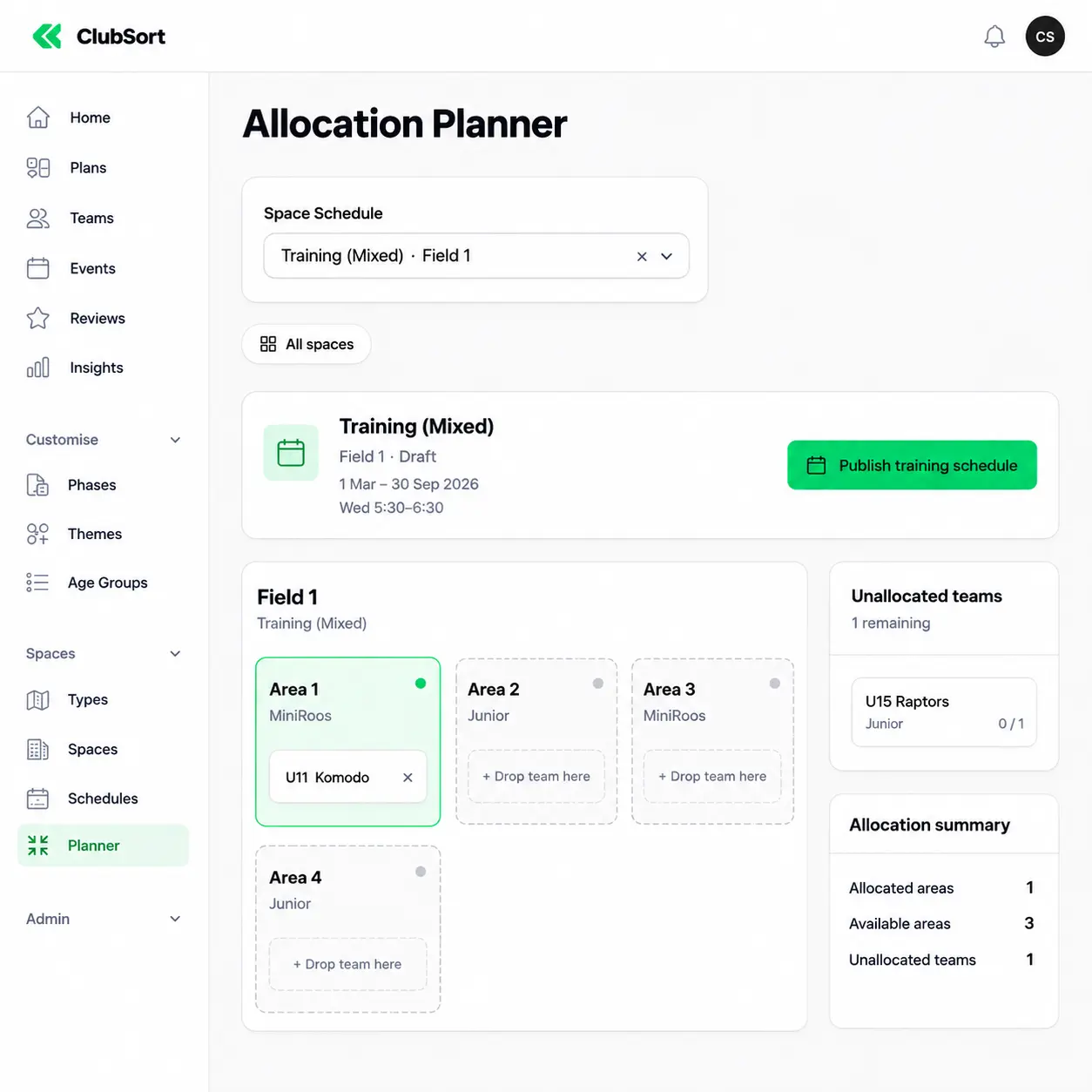
ClubSort's Allocation Planner gives managers a visual way to organise training spaces and assign teams to available areas.
Instead of working through rows and columns, managers can see the spaces available and where each team has been allocated.
Teams can be moved between available areas while the schedule is still being prepared, making it easier to experiment with different arrangements before anything is published.
Build the schedule first. Publish it when you're ready.
Turn the spreadsheet into a draft
One of the biggest benefits is that a schedule doesn't have to be perfect before you start.
Managers can create a draft allocation, move teams around and see what is still available.
The Planner can show:
- Which teams have been allocated
- Which spaces are still available
- Which teams remain unallocated
- How many areas are being used
- Where capacity is still available
That makes gaps much easier to spot.
Instead of discovering that a team has been missed after sending the schedule to everyone, managers can identify the problem while they're still building it.
Make managers' jobs easier
Training allocation is often one of those jobs that falls to a manager or volunteer who already has plenty to do.
They shouldn't need to be a spreadsheet expert to create a workable schedule.
The Planner is designed around the decisions they actually need to make:
- Which teams are training?
- When are they training?
- Where can they train?
- Have I allocated everyone?
Once those decisions are made, the schedule can be published for the relevant teams.
The administrative work becomes a visual planning exercise rather than a spreadsheet maintenance task.
Keep control before you publish
Not every change needs to be communicated immediately. A manager might need to try several different allocations before finding one that works.
That's why the Planner separates drafting from publishing.
Managers can work through the schedule, make adjustments and resolve unallocated teams before publishing the final arrangement. This gives them a chance to check the whole picture before the rest of the club starts working from it.
Less spreadsheet management. More time spent actually organising the club.
From allocation to the rest of ClubSort
The Planner also fits into the wider ClubSort structure.
- Teams already exist in ClubSort.
- Their coaches and players are already connected.
- Training events can be created around the schedule.
- Attendance can then be managed against those events.
- The allocation isn't another isolated spreadsheet that sits outside the rest of the club's information.
It's part of the same system.
A small change that makes a big difference
Training allocation may not be the most visible part of running a club. But it is exactly the sort of administrative task that can consume hours over the course of a season. Replacing a complicated spreadsheet with a visual planning tool won't change the sport.
It changes the work required to organise it, and that's what ClubSort is designed to do.
Less time managing the schedule. More time supporting the teams that use it.