
More than just an age group
The Age Groups feature is designed to do much more than separate players into appropriate age based teams. While it provides a simple way to organise members into age groups, it also acts as the foundation for how teams, matches and game events are managed throughout your club.
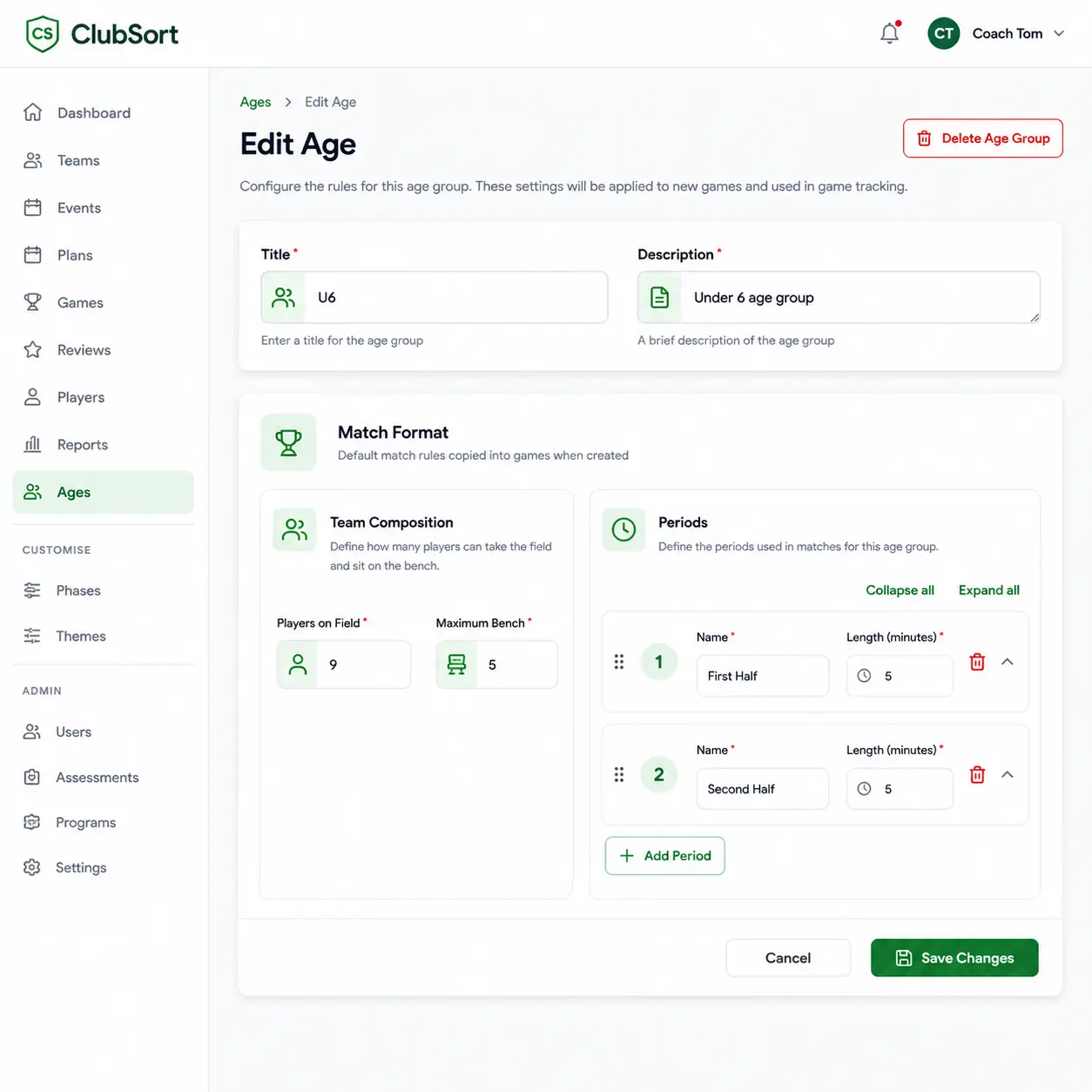
By configuring an age group, clubs can define team structures, player numbers and match formats that automatically flow through to game management and game tracking.
Each sport, competition and age division is managed using rules that reflect how the game is actually played
Define team sizes your way
Each age group allows clubs to specify the number of players who take the field or court, along with the number of players who can be listed on the bench.
This flexibility supports a wide range of sports and competition formats, including:
- Football with 11 players on the field and a defined number of substitutes
- Basketball with 5 players on court and additional bench players
- Junior modified competitions with reduced player numbers
- Small sided formats used for development programs
- Social and recreational competitions with custom team sizes
Once configured, this information is used throughout the platform to correctly display players in game line ups, on field positions and bench allocations.
Configure match periods
Every age group can define how many periods are played and the duration of each period. Clubs can also assign meaningful names to each period so that terminology matches the sport being played.
For example, a senior football competition may be configured as:
- First Half – 45 minutes
- Second Half – 45 minutes
A basketball competition may instead be configured as:
- Quarter 1 – 12 minutes
- Quarter 2 – 12 minutes
- Quarter 3 – 12 minutes
- Quarter 4 – 12 minutes
This allows coaches, team managers, officials and players to work with familiar language rather than generic system labels.
Supporting game event tracking
The age group configuration becomes especially important when matches are being managed live.
When game events are tracked, the configured age group determines:
- How many players are displayed in the starting team
- How many player positions are available on the bench
- How many periods are available during the match
- The name of each period
- The duration of each period
This creates a match experience that reflects the actual rules of the competition while reducing manual setup for coaches and administrators.
Easily support finals and special competitions
Many competitions require different match formats during finals, playoffs or cup tournaments. Rather than creating a completely new structure, clubs can simply duplicate an existing age group and make the required changes.
For example, a standard football age group may include:
- First Half – 45 minutes
- Second Half – 45 minutes
A finals version could then be created with:
- First Half – 45 minutes
- Second Half – 45 minutes
- Extra Time Period 1 – 15 minutes
- Extra Time Period 2 – 15 minutes
This approach allows regular season and finals competitions to coexist while maintaining consistent team structures and player management.
Designed for every sport and competition
Whether managing junior development teams, senior competitions, representative squads or social leagues, the Age Groups feature provides the flexibility needed to match the way your sport is played.
By combining age classification, team composition and match structure into a single configuration, clubs can standardise administration, simplify game management and ensure that players, coaches and officials are always working with familiar sporting terminology.
The result is a flexible framework that supports different team sizes, player allocations and match durations across every age group, competition and sport your club manages.